
JVC KM3000 special effects generator - input possibilities

33 replies [Last post]
Martechnology
Offline
Joined: Jul 22 2005
The JVC KM 3000 special effects generator (mixer) has component (YUV) inputs.
 
Does anybody know if it is absolutely necessary to use such component signals with this device? It seems reasonable that it may be possible to apply normal composite signals to the Y input on each channel, and simply leave the U and V inputs either unconnected or terminated to prevent noise pickup. If this is the case then it should be possible to take a processed composite signal from the Y output.
 
Clearly there would be no valid output from the Y/C socket, apart from possibly the luminance component, but this is not critical for the application I have in mind. The worry is that the Y circuit may suppress the colour burst (unlikely, but possible) and/or there might be some sort of comb filtering to take out any chrominance sidebands. If this is the case, then "all bets are off".

I am aware of the necessity to present synchronised signals (either genlocked or frame-synchronised) to the mixer.
 
A quick look at the auction sites shows that there are broadly similar units from other major manufacturers such as, but not limited to, Sony and Grass Valley. The second part of my question is basically the same as the first part, but in respect of such units from these other manufacturers.
 
All advice gratefully received.
 
DAVE M
Offline
Joined: May 17 1999
Re: JVC KM3000 special effects generator - input possibilities
Pretty sure that all you'd get would be a monochrome picture?
 
 You'd be better of looking for a second hand MX50. There was someone on here asking about where to sell his late uncle's and I think I saw it on ebay
Martechnology
Offline
Joined: Jul 22 2005
Re: JVC KM3000 special effects generator - input possibilities
Thanks, Dave. I have been thinking along the lines of getting an MX50 for some time, but  the KM3000 (and similar offerings from Sony and others) tend to cost less because they are older (I think) and are certainly more difficult to use as they need sync'd signals. They also usually accept 8 inputs, whereas the MX50 will only accept 4. This is a school application, so cost and "bang for the buck" are both significant.
 
We have access to a rack of 5 Prime Image frame synchronisers, and if we use one of our cameras as sync source for the rack as well as using it as the safety cam on input 1, we can have 6 active cameras. 
 
Our Leitch 481 switcher, and the modern Kramer switchers, will switch by default in the vertical interval provided all the sources are in sync. I understand that this is not the case for the KM3000, which has to have a sync source applied to put it in agreement with all the cameras. If we were to use cam 1 as the sync source for the KM3000 as well as the rack, is it not possible that the burst signal from cam 1 will enable the Y channels to pass the full composite signal? I'm somewhere between wishful thinking and flying a kite on this one.
 
We have an SPG that we could use to sync the rack and the mixer, but this would potentially lose us 1 camera.


DAVE M
Offline
Joined: May 17 1999
Re: JVC KM3000 special effects generator - input possibilities
To be honest, it's ages since I used a system that needed genlock
 
A studio that I worked in had separate Black burst generators and when we upgraded it I THINK that the new mixer had a black burst output that connected to the CCUs on our new cameras but it was all a long time ago.
 
AFAIK all YuV works the same way with a mono signal and couloiur info delivered via the other lines.
 
Can you download an instruction book of the net?
 
at the end of the day, it's a lot of hassle for what sounds like pretty old kit that's maybe 4x3?
Martechnology
Offline
Joined: Jul 22 2005
Re: JVC KM3000 special effects generator - input possibilities
OK, I'm convinced! We will carry on using the rack and the existing Leitch switcher until finances permit the acquisition of an MX50, or perhaps a Datavideo SE500.
 
Thanks for your help.
.
 
 
DAVE M
Offline
Joined: May 17 1999
Re: JVC KM3000 special effects generator - input possibilities
there's one on uk ebay at around £250 at the moment
it does look well used.
(nothing to do with me)
 
You can get away with running more than 4 cameras into the MX but you need to switch the camera sources when off that channel
paulears
paulears's picture
Offline
Joined: Jul 8 2008
Re: JVC KM3000 special effects generator - input possibilities
If you apply a composite signal to a component input it will be monochrome - I've never seen any input circuitry that automatically detects a colour burst on an input where it's not expected. I had a component Grass Valley mixer that gave a b&w output, no problem - but colour wasn't going to happen. Re: the sync - the issue is simply getting the cameras to match the mixers timing, so if the cameras cannot lock to system sync, then any kind of mix isn;t going to work - the Grass Valley also took quite a while to recover lock with non-syc sources, I'd expect the JVC to be very similar. 
Martechnology
Offline
Joined: Jul 22 2005
Re: JVC KM3000 special effects generator - input possibilities
A reply to Dave M and Paulears:
Firstly, many thanks for your help.

I thought of using asynchronous pre-switching on the school's WJ-AVE5 mixer many years ago, but after considering the operational practicalities I decided not to take that route. Certianly it would  have worked from an electrical point of view, both on the AVE5* or an MX50*, but one has to consider the junior fingers operating the system. The kids would have to remember to select the next  cam for the B input while the mixer output was still on the A input, and vice-versa. This would work reliably enough when the camera sequence was slow and predictable, for example at a speech  day presentation:

Cam 1 - Wide view of stage

Cam 2 - Close up of Deputy Head reading out the name of the next prizewinner

Cam 3 - Medium shot of prizewinner walking up steps onto the stage

Cam 4 - Medium-close shot of Guest of Honour presenting prize

Then back to wide view from cam 1 as prizewinner walks off across the stage and down the steps on the opposite side.
 

But consider what could (and probably would) happen when cutting to the beat in a fast dance routine at one of the dance shows. On average, I estimate that 50% of the transitions would occur  when the pupil selected a new camera on the active, rather than the inactive input. This would give a fast but noticeable glitch on the recording at each affected transition. The output from the mixer  would be a correctly constructed frame (porches, burst, sync, etc.), but the visual content of the frame (and possibly the next one) would be nonsense.

I therefore decided to use a rack of Prime Image frame synchronisers and a Leitch AVS481 synchronous switcher, both of which had been sourced by some enterprising soul from eBay. This  worked with absolute precision at the transitions, but we lost the ability to do soft transitions, ie cross-fades.

Hence the interest in mixers such as the JVC KM3000, or others from Sony (SEG series) or Grass Valley. Such mixers regularly appear on eBay, in fact there are some on eBay at the moment.  However, in view of what has been said in this thread, I accept that my idea to force a comp signal through a Y channel is not going to work. It looks as though we either get an MX50 or something  very similar, or we continue to use the Prime Image/Leitch line-up.

* The AVE5 and the MX50 are 2-bus mixers, so this configuration would work for these mixers. However, anyone who has ideas of a line-up like this but with an MX10 (and I think an MX12), or a  Videotech mixer such as a VMX400 or VMX 410, should note that THIS WILL NOT WORK! These mixers are 1-bus systems. The  A channel has the processing, but is dependent on the B input  for timing and transitions. This means that the B signal must be unbroken and uncorrupted. Switching could take place prior to the A input while the output is showing the B input, but the down-side  is that the output must always be set to the B input while the A input is changed. This may not result in a logical scene sequence in the production.

Once again, thanks for the advice given.

 
paulears
paulears's picture
Offline
Joined: Jul 8 2008
Re: JVC KM3000 special effects generator - input possibilities
I've used most of those from the MX-10 onwards, and to be honest as a two input mixer, the MX-10 wasn't bad as it could cut or mix between inputs and do some rudimentary keying. With just one framestore, switching between two sources was the best it could do, but MX-50s are now not making too much, and I have a great For-A that does 8 inputs with two framestores like the 50. 
Martechnology
Offline
Joined: Jul 22 2005
Re: JVC KM3000 special effects generator - input possibilities
I also used an MX10 for school recordings in the mid 90s, and I found it to be a solid reliable performer. The fact that it would only accept 2 cameras was not a great problem, because 2 cameras was all we could lay our hands on at the time - mine, and one that we borrowed from another member of the Parents' Association. Cameras were a lot more expensive in those days, but the lenses and imagers were good, and would more or less give modern cameras a run for their money in that respect. I still have the Sony TR707E that I used in those days. The picture quality (in 4:3, no 16:9 option) is still excellent, although the tape mechanism has died.
 
The single-bus limitation of the MX10 just didn't matter, and the 1-bit ext cam input was great for titling using an Amiga and a synchroniser. When copying master tapes, connecting the S-VHS master machine to input A and my camera (set in camera mode but without tape) to input B gave great timebase-corrected stable copies.
 
I was sorry to see the old MX10 go, but in about 1998 I was offered an AVE5 at a good price, so I made the change. In my view it was no better in respect of picture quality than the MX10, and the title superimposition was not as good. It did, however, have the advantage of being capable of usage as a 2 channel frame synchroniser.
 
By setting the main (recording) output to A, and the wipe/fade control to B, the A camera signal will appear at the main output(s) and the B camera signal at the preview output. Most importantly, the 2 signals will be in step.
 
Taking a 3rd and 4th camera and applying their signals to A and B on a second AVE5, and setting the mixer controls as for the first mixer, cams 3 and 4 will be in step with each other.
 
However, 1 and 2 will not be in step with 3 and 4. Luckily this is easy to correct. Just take a multi-output SPG and apply it's signals to the ext cam input on both mixers. This will put both the mixers in sync with each other, so all 4 cams are now in step. All that is needed now is a synchronous switcher, and the result is a low cost synchronous 4 cam system. Trying to implement such a system with MX10s would need 4 mixers, and would only be able to handle composite signals. Using AVE5s needs only 2 mixers, and we had the choice of comp or Y/C signals. 
 
We used this for a while until the rack of 5 Prime Image synchronisers became available. We could then do 5 cam shoots - good for drama and dance, but a bit over the top for the more formal shoots.
 
I would be fascinated to know why Panasonic chose to call the external sync / title input "external camera". I have never come across a mixer fitted with an internal camera.
 
tIt would appear that an AVE5 will pass a 16:9 signal, but is is worth noting that cheap cams only originate 16:9 pictures in 640 x 360 pixels. They then bump them up to 1024 x 576 in software, if indeed they bother to bump them up at all, and the result is not very exciting. If, like us, you are dependent on using whatever hardware you can lay your hands on, and particularly consumer-market cams, it is worth checking the imaging spec before committing to using that cam. This does not apply to users of pro or semi-pro cams, as they will have the full resolution from the outset.
 
tilski
tilski's picture
Offline
Joined: Sep 5 2000
Re: JVC KM3000 special effects generator - input possibilities
Hello again
 
I used the JVC KM3000 for over 7 years in our college studio. I have a manual if you'd like one. I think I may also have the engineers manual somewhere too. There was a point where I was getting emails from Cuba and Japan asking for a manual. Always happy to share knowledge. The others are right though. Inputing the Y will give you a monochrome signal and you will definitely need to genlock everything.
 
It was a solid mixer. Shame to let it go but HD was knocking at the door.
 
There was a JVC KM5000 too. Also a very good mixer and sometimes found as a bargain on Ebay. Make sure it's fully loaded with the input cards though.
 
Good luck.

What's to become of us.... What is to become of us?

DAVE M
Offline
Joined: May 17 1999
Re: JVC KM3000 special effects generator - input possibilities
Do you need to do it live at all? What are you recording too?
 
 I still use MX50's for live relay and to be honest, with decent cameras and recording to DVCam, it's good enough for live event recording as well.
Where fast turnaround is important, as-live is good.
 
To make pre-switch easier, I'd use two specific cameras into one specific channel, this minimises cock-ups and can use lesser used angles.
 
But Final Cut or a series of NLE's will do multicam allowing the "whoops!" factor to be eradicated
which is what I do if I'm doing something more important/less involved/more complicated.
Martechnology
Offline
Joined: Jul 22 2005
Re: JVC KM3000 special effects generator - input possibilities
A reply to both Tilski and Dave M.
 
First Tilski.
 
I have not yet acquired a KM3000 or another similar mixer from a different mfr, and based on advice I have received from members of DVForums, I will not be getting one. The Pana MX50 seems to be the way to go for manageable multi-cam shoots.
 
However, despite being well into my 60s and retired, I am an industrial-strength geek, so if a KM3000 or similar crops up locally for next to nothing I probably would not be able to resist it. So many thanks for your kind offer of a copy of the manual - I may be taking you up on it!
 
(Do you have it as a PDF file that could be e-mailed?)
 
To Dave M.
 
This all started at a very low level in 1994 when I was the Chairman of the Parent's association at my son's school, recording small scale events just out of interest. It blossomed with the acquisition of an MX10 mixer and the availability of a second cam from another parent.
 
Then the kids started getting interested, and a video club came into existence.
 
Another parent who had recording studio experience (audio only) joined in and raised the audio quality of our efforts significantly. The school chipped in some funds, and we were able to  shop on Loot (eBay was not at that stage the force in the market place that it is now) for an AVE5 vision mixer, a large audio mixer, frame synchronisers, a synchronous switcher, a rack of video distribution amps, consumer cams, and various other goodies.
 
Somewhere along this path, while my son was still at the school, I became a governor. That ceased in 2004 when my term came to an end, and I was ineligible for re-election as my son had left. As I was by then starting with some health problems, I did not continue with the video club.
 
I am now at the point of digging my old video gear out, with a view to initially doing wild-life shots. (My wife has set up bird and squirrel feeders in the garden.) I have acquired extra cams as they have dropped in price considerably on the secondhand market, and it seem that it would make sense to pension off my old AVE5 mixer and get something with more inputs. I could then monitor and record from various locations in the garden at the same time. Recording would be to my Pana EX89 HDD/DVD recorder.
 
I would also like to be able to put together a system that could be lent to the local schools.
 
NLE is not appropriate to me for various reasons:
 
 - I don't have the skill, the software, or even a suitable computer.
 
 - I don't have the patience.
 
 - It would mean loading up at least 4 camera with tape, running them for an hour, then going out to re-load them thus scaring the birds away for another 10-15 munutes.
 
What it all boils down to now is that your recommendation of an MX50 is excellent, and the only other things I would need to get are long cables to run from the cam positions to the desk which would be located indoors.
 
I have been a member for nearly 8 years, but this is the first time I have posted a topic and asked for advice. I am really impressed with the friendly and helpful people who have offered me the benefit of thei experience.
 
Thanks to all of you.
 
 
Wisz
Offline
Joined: Jan 30 2001
Re: JVC KM3000 special effects generator - input possibilities
Actually if you Google "JVC KM3000" the first item that comes up is the user manual.

I know it's a shock Google actually coming up with something useful on the first page wink.

 
And just in case Google tries to make me a liar:
 

Richard Wisz Media Services

paulears
paulears's picture
Offline
Joined: Jul 8 2008
Re: JVC KM3000 special effects generator - input possibilities
I remember very well bodging an MX50 to make a tally system - and it even kind of worked! 
 
The one we had at college was let into a desk surface, and was switched on continuously for at least 5 years - and despite being prodded with hard objects rather than fingers, never missed a beat!
DAVE M
Offline
Joined: May 17 1999
Re: JVC KM3000 special effects generator - input possibilities
so you're doing wildlife?
 
 Assuming that you're doing this on a budget with existing tape based cameras (and some sort of weatherproof cover?) you can run VERY long "S_VHS" /Y-C leads.
Assuming that the cameras have a Lanc connector you can remote start them to save tape and even battery life. But you'd need long cables again and they are not cheap.
 
If you're a bit of a geek then you can make lanc cables but the 2.5 mm plug is a pain so I'd buy a short cable and cut it in two, extending it.
 
 You can go the whole hog and use remote pan and tilt heads which again use long leads that need DIN cables to control them.
 
take a look at cameragrip and keene electronics for prices and maybe lectropacks if they still exist?
Martechnology
Offline
Joined: Jul 22 2005
Re: JVC KM3000 special effects generator - input possibilities
Wisz, I tried googling as you suggested, and you were right. I have downloaded the manual. Thanks.
However, this is the response from the full address you suggested for the manual:

404 - Datei oder Verzeichnis wurde nicht gefunden.
Die gesuchte Ressource wurde möglicherweise entfernt oder umbenannt, oder sie steht vorübergehend nicht zur Verfügung.

At least they stopped short of "Achtung, achtung, Kartoffelkopf!"

I get the impression that the manual is not there.

-----------------------------------------------------

Paulears, I would be interested to hear how you implemented a tally system on an MX50.

-----------------------------------------------------

Dave M, You mention tape-based cameras (which I will use), and starting and stopping them, which I will not be doing because the cams will not have tape in them. They will be hard wired back to the mixer on the monitoring and recording desk indoors.

I plan to make my own long signal cables using 8-conductor Cat5e UTP cable, and baluns available cheaply from eBay suppliers in China or Hong Kong. Check out:

http://www.ebay.co.uk/itm/1-pair-Video-Balun-Transceiver-BNC-1-Channel-video-Balun-Transceiver-for-CCTV-/300874796705?pt=US_Surveillance_Cables_Adapters_Connectors&hash=item460d890ea1

I have successfully experimented with a composite link using 1 balun at each end. The next logical step is to make an S-video link with 2 baluns at each end, one each for the Y and C signal components. The sound (both L & R) would be carried on the 2 unused twisted pairs. I only hope that the twisting will eliminate the frame-rate buzz being picked up (crosstalk) from the Y pair. Time will tell.

These commercial baluns have a plastic case which is usually easily removable (single screw), enabling the PCB to be lifted out. I plan to do this and mount the PCBs in plastic cases available from Maplin. I will fit captive S-video and stereo phono leads at one end, and a DB mini 9 socket at the other. This means that I will have to use DB mini 9 plugs on each end of the cable. I have chosen this type of plug and socket because they are far more robust than the standard RJ45s, and they can be screwed into place so they don't fall out if tugged.

As regards remote control, LANC confers the ability to zoom in and out, also to power on and off. I have a Jessops hard-wired LANC controller which will accomplish these and other functions 

I have in the past made long LANC cables (for the school, so they are no longer available to me) using 4-core BT installation cable. 2,5mm plugs don't scare me - you just have to use a soldering iron with a small enough tip. You can read about this on Videopages which is a web site I used to write, and in fact still own:

This gives details of a shoot in 2004, and I mention a Jessops motorised pan/tilt head. I still own it, but I have no idea where it is!

There is another description of a similar shoot in 2002:

http://videopages.awardspace.info/multicam.htm
Hope you find the foregoing of interest.
 
paulears
paulears's picture
Offline
Joined: Jul 8 2008
Re: JVC KM3000 special effects generator - input possibilities
I used a 'sniffer' - diode and resistor for current protection and reverse isolation onto the button LEDs, just a tack onto the board solder pad. a simple semiconductor switch to drive a small relay. I started with one row, and that worked fine. Plan B was to do the same on the other row, and then use the crossfader leds to determine which one got priority. I never quite got this working as I couldn't quite get the logic to work properly. Then I transferred to a different department, and last time I went back into the control room, the ribbon cable was still hanging out the back. My switch box vanished! There was a net circuit for a version a few years back, but I can't track it down.
 
EDIT
 
 
found it!
 
 
DAVE M
Offline
Joined: May 17 1999
Re: JVC KM3000 special effects generator - input possibilities
you might get timing issues with the baluns. Try to keep the cables as  close in length as poss. I don't know if cheap baluns have timing issues themselves but keeping too the same brand might help.
 
I use baluns to shift cable long runs in composite
 
 The jessop/hague pan head is pretty good for the money.
 
 getting more computer based, there may be cards thast are affordable that allow multiple cameras to be run into the computer and a "virtual " mixer/switcher to allow recording on a computer.
I know that you can do it for thousands, but not sure about 100's
Martechnology
Offline
Joined: Jul 22 2005
Re: JVC KM3000 special effects generator - input possibilities
Paulears:
 
Thanks for the advice about tally systems, and the link. If I get an MX50, I will go into this in detail.
 
Dave M:
 
Timing error is not something I had considered when using baluns, having only dabbled with a relatively short composite link (without any problem). I assume that the timing error shows as a longer propagation time for the C signal, resulting in the colour appearing slightly to the right of where it should be on the screen.
 
It makes sense to use identical baluns for both Y and C, and identical baluns at both ends of the cable, but if the problem is due to transmission inconsistencies between the Y & C signals, perhaps due to a slight impedance mis-match somewhere (at an interface?), then the error is going to be "cast in stone".
 
On the other hand, companies such as Vortex (http://www.vtx.co.uk/) have been producing ready made balun based interface boxes for years, and they are not going to put their good name at risk by supplying items which cause signal errors.
 
I am unlikely to be producing cables longer than 50 metres, so I hope that errors will be so small that they are un-noticeable. If I do have a problem, I can always go back to a composite/UTP link, or 75 ohm screened cable. I have used TV aerial cable on many occasions at school, and I know that this works. Or if I am feeling rich I could invest in RG59. An S-video link could possibly be implemented using a pair of identical 75 ohm cables, presumably held together with cable ties or insulating tape at various points along their length, but this is a rather cumbersome "Heath Robinson" solution.
 
Many years ago I go involved in an e-mail exchange with a videographer (I think he was somewhere in Essex) who was using balanced mic. cable to transmit an S-video signal over an unspecified distance. It seemed to work for him, but I would be worried about the cable impedance, and crosstalk either induced directly or getting in via the common earth return (the cable screen) used for both the Y & C signals.
 
You mentioned the use of computers. I am unlikely to get involved with computer editing, because this implies recording on tape in the cameras, then editing later. My objective is live recording, selecting images using a mixer or synchronous switcher, as we used to do at school events. However, my (old) PC has a Firewire card with 3 inputs on the back and one inside, so taking a leaf out of your book, I am wondering if it is possible to get some software that would enable me to run 3 cams into the card, and do real-time switching while recording onto disk. A limitation here would be the permitted (and available) length of 1394 cables. Bear in mind that the primary use would be to link between the control desk indoors to bird table and squirrel feeders which are located well away from the house.
 
One possible use for the computer would be to control the cams via LANC using an RS232 controlled box containing an ELM624 device:
 
 
and:
 
 
On the financial side, thousands are for cars. Hundreds are a possibility for fancy hardware (perhaps an MX50) provided I can fully justify the purchase in the context of intended usage. (I have the Chancellor of our particular Exchequer sitting beside me as I write this.) Tens are not just possible, but actually very likely for cables and interface components. The zero-cost contribution will be from the boxes and cupboards of video gear I have collected over the years.
 
DAVE M
Offline
Joined: May 17 1999
Re: JVC KM3000 special effects generator - input possibilities
Just a thought - 
 
 The MX50 doesn't  have a monitor out for camera previews. So you either need to loop through or run splitters.
 
A more recent (and expensive?) Datavideo may offer a cost benefit as more modern mixers have a quad spit output.
 
I have a Telestest supplies security type quad spluuer that I used to use with the MX - I now run splitters to separate 7" mons.
 
I also use a Pani AV-450 mixer (or something like that) and it all comes up as all monitor outputs on one . But that's HD.
 
 
you can get CAT5 YC baluns for around £15 each one cable.
Martechnology
Offline
Joined: Jul 22 2005
Re: JVC KM3000 special effects generator - input possibilities
A reply to Dave M:
 
I hadn't realised that the MX50 lacked monitor outputs. This seems like a fundamental error of judgement by Panasonic. However, it does bring back into play the possibility of using two AVE5s as synchronisers as in my post #9 (March 13, 09:58).
 
I do in fact have a couple of AVE5s, an SPG, and a 4x1 Kramer switcher, so I could cobble together a viable system for no additional cost apart from cables. Using the AVE5s means that I have an independent choice in respect of each input concerning the use of either a composite or a Y/C camera. There is a (composite) monitor output on each  input channel. Somewhere I have a CCTV quad, so if I can find it I can monitor all 4 inputs on one large monitor. The downside is that the Kramer switcher is composite only, so there will be a small quality loss before the signal reaches the recorder. Alternatively I have a Kramer 12x2 Y/C switcher that could possibly be put into service, but this has a dodgy selector switch on channel 1. It is donkey's years old, but it might be possible to fix it. Or I could just use channels 2-5 rather than 1-4.
 
Which Y/C baluns are you recommending? As far as I know, the Vortex or Muxlab products are rather more expensive than £15.
DAVE M
Offline
Joined: May 17 1999
Re: JVC KM3000 special effects generator - input possibilities
I had a link yesterday but can't find it now.
 
Google something like YCuk Balun video S-vhs and all permutations. I will be at the same computeron Monday and can go through the history
paulears
paulears's picture
Offline
Joined: Jul 8 2008
Re: JVC KM3000 special effects generator - input possibilities
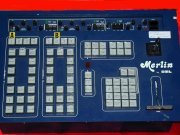
If you really need something to mix your stuff, I've got a pretty old GML Merlin in a rack. I've not used it for ages, but I assume it's still working - composite inputs, 4 of them - with two synchronisers, and loads of effects and picture in picture. If you really need something, I'd be quite happy to loan it to you - open ended, if you can cover the postage. It's quite heavy, but I could take it out and weight it I guess. I'm in Lowestoft so few people ever come this way, but the offer is there, if you're stuck.
 
DAVE M
Offline
Joined: May 17 1999
Re: JVC KM3000 special effects generator - input possibilities
Martechnology
Offline
Joined: Jul 22 2005
Re: JVC KM3000 special effects generator - input possibilities
A reply to Dave M: Thanks for the info,but I won't be using this sort of balun interface. While there is nothing wrong with them per se, they have certain limitations as far as my application is concerned.
 
Firstly, they will only handle 2 channels of information, ie the luminance and chrominance signals.
 
Cat5e UTP has 4 twisted pairs, which permits 4 channels of info. In my design I propose to use 2 channels via baluns for the S-video signals, and the other 2 channels "straight through", ie without baluns, which I can use for stereo audio or mono audio and LANC data. 
 
Secondly, they use RJ45 connectors on the line side, whereas I propose to use DB9 connectors which are far more robust, and can be retained with screws.
 
Thirdly, they are expensive. I expect to put together my own interface boxes at lower cost using components from Maplin and / or CPC-Farnell.
 
Once I have cobbled together a working lead I will report on the results here on DV Forums.
 
Once again, thanks for your advice.
 
paulears
paulears's picture
Offline
Joined: Jul 8 2008
Re: JVC KM3000 special effects generator - input possibilities
I've had pretty good success with video multicore. I've got 4 drums, and each is terminated with 2 X BNC 2 audio and a dc connection. The DC is the part that caused the most hassle as the conductors are too small, so resistance high and volt drop sufficient that a 13.8V supply is below the low limit of my older cameras. The two video cores allow me to do composite or Y/C or  but not y/u/v of course. I have 30, 40 and 60m versions.
Martechnology
Offline
Joined: Jul 22 2005
Re: JVC KM3000 special effects generator - input possibilities
A reply to Paulears:
 
I had a look at video multicore cables at Maplin, RS Components, and CPC-Farnell, and the costs are truly eye-watering. This is not so critical if you are doing videography professionally and can recoup your costs, but it is less appropriate to an out-and-out amateur like myself who is trying to get some final value for money out of a collection of older video gear.
 
Cat5e UTP can be bought for about £60 including VAT from our local electrical wholesaler for a 1000 ft (305 m) drum, so the cable cost is marginally less than 20p per metre. The cost of a balun box at each end has to be added, but these can be cobbled together at fairly low cost from readily available components. A likely configuration is 2 video channels and 2 audio, but other configurations are possible. I already have most of a drum of Cat5e somewhere in the loft, bought for a project some years ago.
 
One thing I would not like to try with Cat5e is running power to the cameras through one of the twisted pairs. The loop resistance is 1.8 ohms per 10 m, leading to a measurable power loss. Worse, the loss is directly proportional to length, so for every different length of cable the loss would have to be calculated and the supply voltage varied to enable the right voltage to appear at the camera. Even that could lead to problems, as the camera's current demand would vary according to function. For example, going from recording to standby would cause the voltage at the camera to rise as the current consumption falls. Using 2 of the twisted pairs in parallel could go some way to alleviating this, but it is not a complete solution.
 
A possible solution which would work electrically (but would be cumbersome and a bit of an eyesore) would be to run a second cable, periodically taped or cable-tied to the signal cable, solely for power to the camera. Our local wholesaler sells 2182Y mains twin 0.5 sq mm, 3A rating, for £20.34 for a 100 m drum, For the full belt-and-braces approach, the 0.75 sq mm 6A rated equivalent is £27.54 for a 100m drum. I have used the 3A cable when I was doing video at school. I used it for mains, the camera PSU being at the camera end. This worked OK. If I were to use such a method for low voltage DC, I would go for the 6A type.
 
As you are getting too much voltage drop with your existing multicore cables, you may wish to consider this possibility. If you are using the system where other people are about, perhaps the low voltage to the camera option would be better.
paulears
paulears's picture
Offline
Joined: Jul 8 2008
Re: JVC KM3000 special effects generator - input possibilities
I got the cable quite cheaply from someone on ebay, at the time I was setting up to do multi cam shoots (an investment that never recouped it's cost) and I bought some variable voltage PSUs, and simply slowly ramped up the voltage until the cameras were happy - then fixed the knob, and labelled that PSU so it would always be used with the same cable and camera. I do work in many theatre and cat5 seems the favourite way of getting video around buildings, mainly because they have the cabling installed all over, and via patch panels - so it works pretty well. They do get issues with the luminance and chroma moving apart but on smaller monitors it's ok.
 
In fact people are now squirting video and audio down cat 5 with pretty good results. 
 
Cat 5 cable is stupidly cheap, although it firms up if you want tougher types. I just paid nearly £100 for 60m on a drum, with Neutrik ends for my digital audio system.
Martechnology
Offline
Joined: Jul 22 2005
Re: JVC KM3000 special effects generator - input possibilities
A reply to Paulears:
 
I must admit that I am jealous of the videography portion of your life. I would love to have the opportunity to do multi-cam recordings of theatre productions, with the excitement of live mixing.
 
It is interesting that you mention the luminance and chrominance signals "moving apart". Dave M has also mentioned timing errors. I assume that Y & C are subject to different propagation delays, causing the colour to arrive earlier or later than the mono signal, thus putting the colour in the wrong place on the screen (& in the recording). Is there a practical cure for this, or do we abandon Cat5 and go back to screened 75 ohm cable?
 
I used long lengths of TV aerial cable for composite links when I was doing school video, and never had any problem with C turning up at the wrong time. Perhaps this was because TV aerial cable is good for up to 1000MHz, so a PAL signal that only goes up to about 5.5MHz is just a walk in the park for such a cable.
 
paulears
paulears's picture
Offline
Joined: Jul 8 2008
Re: JVC KM3000 special effects generator - input possibilities
I'm not sure exactly why this seems to happen - the maths/physics suggests that you need around 5m or more of extra length to produce the sort of delays that split the luma and chroma apart on the screen, which seems to suggest that cable length is probably not the problem in most cases. I wonder if it's simply the proximity of the two signals in the cable? The cable being balanced by design in cat5 means this shouldn't be possible - but certainly in a coax system, maybe the unbalanced coax does leak a little and this is what we're seeing as degradation. I do know that multicores can be a problem. Last year we did some 3D, huge screen projection and the distribution to the projectors was cat 5, and the images were perfect. The previous production I did with 3D, we got it to the projectors via multicore, and there was a bit of fudging required to get stability - the cable had more cores than we needed, and I remember in desperation swapping the colours, one by one until I found replacing the red one cured the problem. No idea why - damaged cable, poor connector terminations? No idea - as soon as it worked, I stopped looking!.
 
As for the multicamera work - the problem with it is simply the cost, and the inconvenience to the venues - and often, time. Cables are a huge problem in theatres. Getting a cable to the best places may simply be impossible. Many have cable routes designed to go from stage to back of the stalls - used all the time for lighting and sound cables on touring shows. Very rarely is there a route up to the circle or Gods. Expensive radio systems for me are out of the question. So I'm looking at trying to find cable ways that are ok to the venue. Some allow gaffer taping when the cable crosses an exit/entrance route - for others this is verboten! It's their building and their call. You also have some who have a rule that requires video recording to be a ticket condition - so each person buying a ticket gives their permission to be recorded. I've actually had somebody near me in an auditorium ask with a worried look if I cannot get their face on the camera, because they're with somebody they shouldn't be! The extra work means extra time and more expense, let alone the extra person needed to sit at the PPU. The wedding people know how even just one extra camera costs, with three or four people adding video can be expensive. We did a dance show with 3 cameras, with 2 operators and the usual after edit. I offered a screen and projector for free, and the extra cost was just one person - but it's just stretching their budgets too far.
 
Theatre hire for these people can be between £2000 and £3000 for their show. Add the cost of other production items (costumes often get paid for by the parents) but maybe some cloths to hire and possibly a bit of scenery. Some dance schools make parents buy the DVDs, others offer it as an option, but nowadays, parents copy the DVDs - not all, but an increasing proportion. The ticket price just doesn't generate enough funds to be clever. What I do can be exciting, but it just doesn't actually make much money!
DAVE M
Offline
Joined: May 17 1999
Re: JVC KM3000 special effects generator - input possibilities
A bit like Paul, I do a fair bit of live stuff but in 2 different ways.
 
 One is live mix
 
I'd be doing a predictable show with few chances for cockups camera wise, and be doing it several times to justify a true live mix.
 
One gig that I do involves a 4 camera mix done live because it is projected onto a roughly 30x20 screen at the back of the stage and also distributed around the building to maybe 7 different locations/outputs.
 
I send composite to the projection crew and they bump it up to VGA (or a derivative)  and then send that around the building via CAT5.
 
It also goes out on the web as a stream.
 
I'm there for a week running 2 x two hour shows a day and it is also recorded live to be used in a DVD later.
 
I can manage this with 2 people and it takes around 2 hours to rig/de-rig 
 
It's essential that you communicate with the theatre techs, I used to be one so I approach it from the right angle I think.
It's rare that you get a jobsworth, they are doing whatever the management has decided but if you're nice to them will often go out of their way to sort you out.
 
If I was doing a non relayed project, I could do it with iso cameras and cut it live later on FCP with multicam but if you're doing lots of predictable shows with a quick turnaround of the DVDs it makes sense to do it live.
 
The trick of a camera cock up live is that even if you press the wrong button, so long as it's not a shot of the floor or something, stay on it for a reasonable amount of time as the punters don't know that you pressed the wrong button.
using Multicam means that you can refine your cuts ad nauseum.
Martechnology
Offline
Joined: Jul 22 2005
Re: JVC KM3000 special effects generator - input possibilities
A reply to Paulears and Dave M:
You are both, being professional videographers, much further up the learning curve than I am or will ever be. For example, your camera operators appear as a cost to your operations, whereas when I had more than one cam op, I had to rely on school pupils in their early to mid teens turning up for all the evening shows.
 
The annual dance shows were the major project of the school year, and the amount of effort put in by the dancers, choreographers, lighting, sound, and stage crews had to be witnessed to be believed. Each dance show was run through as a dress rehearsal on a Wednesday afternoon, then there were shows for the pupils, parents and friends on the Thursday, Friday, and Saturday evenings. The Saturday show was the "big one". After the finale, the Headmaster would make a speech of approval and thanks, then there were presentations for the teacher in charge and the 2 senior girls who put the whole thing together. After this, there was a encore of one of the dance routines followed by a re-run of the finale. For all those who were involved, they (we) were running on pure adrenalin for the show and for 48 hours afterwards.
 

The video crew, that is the pupils of the video club who operated the cameras and the vision mixer with me as the supervisor, had to be there for all performances. By the time the show was live on the Thursday evening, all the dancers had their routines precise to the nearest millimetre and plus or minus one millisecond. Not so, however, for the camera ops. They had Thursday and Friday to familiaise themselves with the routines - not the arm and leg movements, but where each girl would be on the stage - ready for the official recording on the Saturday evening. And to their credit they did it without disasters or even minor errors. Recordings were made on both the Thursday and Friday evenings in case anything went wrong on the Saturday. It would give us the opportunity to insert-edit an earlier dance routine into the Saturday recording if necessary, but we never needed the earlier recordings.

The camera crew came in initially on the Thursday evening, and each camera was allocated 2 ops, so that if an op had to pull out for any reason, there would be a fully rehearsed understudy to take over. However, when they came in, all the installation work - power, vision, LANC, remote, and talkback cables, remote hi-level camera mounts, interfacing with the school sound desk, etc  - had been done by me, on the Monday and Tuesday during the all-day rehearsals which were taking place at the time. I remember on one occasion getting very dirty looks from the girls rehearsing on stage as I was up a ladder with a 1000W hammer drill, drilling into the school wall 8-10 feet above floor level to put in a hi-level camera mount!
 
Bear in mind that the cameras we used were not the professional type. They were just domestic camcorders - whatever we could get our hands on at the time, either begged, borrowed, or even paid for with real money. The vision mixer was initially a Pana MX10, then a Pana AVE5. Only later did we get the rack of 5 Prime Image frame synchronisers and the Leitch switcher.
 
The sound was first dealt with by feeding a long screened lead back from a cheap electret capacitor mic in the hall to the mic input on cam 1, and taking the pre-amplified output from the cam to the line-level audio input on the mixer. This worked with the MX10 mixer because it was earthed, but when we put the double-insulated and therefore unearthed AVE5 mixer into service, the audio hummed like a swarm of bees until we figured out what was wrong.
 
The first sound mixer was a Tandy domestic mixer which I bought from a boot sale for about £3. This was superseded by a Soundcraft "Notepad" - superb quality, but no sliders. This was replaced by the Seck 122 12 channel desk, which, despite it's age, was truly broadcast quality. A year or two after this I bought (for myself, not for the school) a Behringer Eurorack MX1602, so that the Seck desk could be used by the school for the production itself, and a balanced signal taken from the FX outputs of the Seck to the balanced inputs on my Behringer desk.
 
The Pana mixers only had unbalanced inputs, so we had to take the unbalanced outputs from whatever mixer we were using to the aux line-in on the Pana.
 

Somewhere along way , the school invested in some balanced audio tie lines. 4 went from sockets on the front of the stage to a box in the wings, and another 4 from this box up to the gallery/control room where we techy types worked. There were patch cables to link the stage lines and the up-lines at the box. I must admit, I would have preferred switches. The school also invested in some Audio-Technica "Midnight Blue 3000" dynamic mics, which were brilliant quality, ideally suited to the orchestral and jazz concerts.

The old adage: "It'll be all right on the night" seemed to work for me except for one occasion many years ago, at the time when the school had a not particularly good P.A. amp, and my audio link from that amp went down for no reason I could find either at the time or later. A junior speech day recording was abandoned on that occasion.
 
Speech days I usually did myself, as the positions and movements of people were so predictable and defined that I could set up the cams and leave them, just pressing the appropriate button when needed.
 
If you are ever in the situation of working with people who are bubbling over with enthusiasm but a bit short on experience or technical knowledge, be careful about who is allocated to the sound desk. I had a problem in 1998 when a boy who thought he knew the lot was allocated sound. He was one of the school crew, not one of my video club pupils, so I couldn't do anything about the problem. He ramped up the sound for the finale, to the extent that the output was distorted. Unfortunately the overload occurred before the tape out socket on the school's rather nasty P.A. amp. That was the sound source that the video club was using, so the sound on the recording was distorted and we could do nothing about it. We addressed the problem in later years by getting the school a Seck 12 channel desk and taking the recording feeds from the FX outputs BEFORE any damage could be done  to the sound quality.
 
To come back to the matter of cables, I have no idea why a time separation should develop between Y & C, but I will be on the lookout for the problem. It is uncertain whether I could get involved in school recordings again - it is over 8 years since I left, and I am not as sprightly as I was at the time - but I will be experimenting with cables for wildlife cams in the garden when the jet stream starts behaving itself for a change. I will report any relevant technical finds.
 
It is interesting how this thread has developed. I started with a query about using an old JVC mixer with more channels than a domestic mixer. I thought I could use this for wildlife videography in the garden. Since then the discussion has ranged through alternative mixers and how to modify them, cables, cameras, and the resources and techniques used for the larger projects. I would like to propose a vote of thanks to the instigators and managers of DV Forums for providing the cyberspace where these discussions can take place.
 
paulears
paulears's picture
Offline
Joined: Jul 8 2008
Re: JVC KM3000 special effects generator - input possibilities
As it happens, we're doing a dance show today, although I'm looking after staging, lighting and sound - and Trevor from a local video company is doing video. He's pulling his hair out because on the same job a year ago, he finished the edit and duplicated the DVDs to be informed they discovered one student has a protection order, so her image cannot appear in the DVD. So he had to do the lot again. This year he checked and one of the schools participating have similar - so one group won't be shot, and the girl can't have her picture taken in the group photo. At least he knows this year.
 
I loved the bit about dancers having millimetre accuracy. My experience is they can only count to eight, starting at five, and the accuracy level is perhaps to a metre, based on today's lopsided spacing across a big stage.